
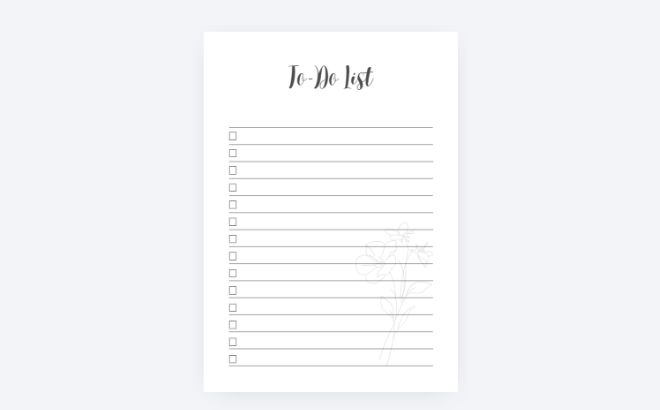
There is something magical about putting pen to paper. Here is a simple step-by-step guide to follow to create one. As soon as you finish this tutorial, you can customize it with your own ideas and make your digital work stand out.
The Step-by-Step Process
Step 1: Set Up Your Canvas
-
Open Canva and click on “Create a design”.
-
Select “Custom size” and change the unit from
pxtomm. -
Enter 210 x 297 mm (A4 size).
-
Pro Tip: Go to File > View settings and turn on “Show margins”. This ensures your design stays within the “safe zone” for printing. Additionally, you can turn the ruler on just by entering Shift+R on your keyboard.
Step 2: Add Your Title
-
Press ‘T’ on your keyboard to create a text box.
-
Type your title (e.g., “To-Do List” or “Weekly Planner”).
-
Choose a clean, aesthetic font. I recommend Serif or Montserrat fonts for a more “premium” look.
-
Change the color from pure black to a dark gray for a softer, more professional feel.
Step 3: Create the Lines & Checkboxes
-
The Lines: Press ‘L’ to create a line. In the top menu, set the Line Weight to 1. Stretch it from the left to the right margin.
-
The Boxes: Press ‘R’ to create a square. Resize it until it’s small (about 4×4 mm). Set it to “No Color” with a thin border.
-
Alignment: Select both the box and the line, then click Position > Align Elements > Middle.
-
Duplicate: Once the first line is perfect, select both elements and press Ctrl+D to duplicate them down the page. Canva will help you keep the spacing equal!
Step 4: The Botanical Touch (Watermark)
-
Go to the “Elements” tab and search for terms like “minimalist leaf” or “line art flower”.
-
Place the element in the corner of your page.
-
The Secret: Click on the Transparency icon and lower it to 15% or 20%. This turns your illustration into a subtle watermark so you can still write over it easily.
Final Thoughts
Designing your own stationery is not just about being organized—it’s a form of creative expression. If you try this at home, I’d love to see your creations!